• Recent Posts

  • Tags (Categories)

  • Archives

  • Pages

  • March 2026
    M T W T F S S
     1
    2345678
    9101112131415
    16171819202122
    23242526272829
    3031  

2009 Student Technology Survey – Post 5

Question #9 in the 2009 LSC Student Technology Survey took a look at student uses of the LSC student e-mail system. Each student is assigned a student.lsc.edu address when they enroll at LSC. We have a college policy that makes e-mail an official means of communication for the college. We have the normal issues of getting students to read their e-mail when we send them out “important” messages – and yes, “importance” is definitely in the eye of the beholder. Our students think that much of the mail we send to them is SPAM. Of course the sender doesn’t think so. We are looking at several opt-in newsletters as ways of cutting down on the messages that not all students want to see. We’ll see how well that works. (Click image to enlarge)

As we saw in a previous post, most students (87%) have one or more additional e-mail accounts besides their LSC student account. We’ve often speculated that many of the students automatically forward their LSC message to another account. Mostly wrong – only 2.7% of the students report doing this.

About 80% of the students consider their school account to be a secondary e-mail account, not their primary account. That doesn’t surprise me at all. 11% say they will continue to use their LSC account after they leave the college. We have continuing conversations about whether we should give students a lifetime e-mail account in order to develop a more active alumni community and to keep some sort of tie to the college after they leave. Not sure how to read into the 11% figure. Not sure if that will be worth the effort. We may want to consider some sort of free option (Google, MS, etc) that allows them to keep an LSC e-mail addy without us having to manage their accounts on a regular basis. Again, we’ll see.

The most surprising news to me was the fact that 55% access their e-mail account through the student portal. The portal is less than two years old and I wasn’t sure how much traffic was going through the portal since they can still access all the services (including e-mail) without going into the portal. The portal is intended to be a single sign-on, one-stop-shop for all of our e-services. Quite frankly I didn’t think that this number of students were using it on a regular basis (at least not yet). So that’s a good thing.

2009 Student Technology Survey – Post 4

Question 6: During the current term, are you a part-time or full-time student? Full-time = 59%, part-time = 40%.

Question 7: Will you be employed during the upcoming (current) semester? No = 18.5%, Part-time = 55%, Full-time = 24.5% (Link to image of questions 6 & 7)

Question 8: How many hours each week, on average, do you normally spend using a computer or similar device (smart phone, etc) for each of the following activities? A) class assignments, B) playing computer games, C) online shopping and banking, D) e-communications, other than e-mail, E) reading and writing e-mail messages, F) listening to digital music, G) reading or writing blogs, H) Internet surfing for pleasure. (Click photo to enlarge)

  • Only a few students (3.5%) spend much time (6 hours or more) reading and writing blogs each week. This helps confirm my suspicions that blogs are for old people (not that there’s anything wrong with old people).
  • 32% say they don’t listen to digital music (or less than one hour weekly, anyway). That number is higher than I would expect.
  • 24% say they don’t surf the Net for pleasure (really, not any kind of pleasure?). What the heck do they do with their lives? We may need some sort of intervention here.
  • 55% say they spend time communicating online in ways other than e-mail. In a future post you’ll see the frequency with which they uses some of the other communications tools.
  • Curious as to why a significantly larger percentage (about 15%) chose not to answer the questions about playing computer games and also about reading/writing blogs. Poor wording, or what?

2009 Student Technology Survey – Post 3

The wording for this question is a bit long-winded, but I really wanted to find out about the students’ self-assessment of their computer skills and ALSO about whether they have concerns about whether their skills will be sufficient for taking online courses. Next time I will try to find a better layout for the question so that there is not so much text. (Click image to enlarge)

Basically, 2/3 believe that they are experienced computer users, and only 4% consider themselves to be inexperienced with computers.

69% have no concerns about having the computer skills needed for an online course, while 30% do have some concerns. Of course this survey questions really begs the next question: what ARE the computer skills needed for online courses? We’ve debated that one a lot. Seems to be a lawyerly answer to that question: “It Depends!!”

2009 Student Technology Survey – Post 2

Question 3: How many email accounts do you have and check regularly?

As the graphic shows, only 13% have a single e-mail account that they use on a regular basis. 33% have three or more accounts. At LSC we assign every student an LSC-hosted e-mail account and we have a policy making e-mail the official means of communication with students. In fact, we don’t send out very much snail mail at all to enrolled students. Therefore, they “should” be using the LSC account on a regular basis. Not surprisingly, the vast majority of students use one or more alternate e-mail accounts in addition to the LSC account. (Click image to enlarge)

Question 4: Do you use wireless Internet access?

Almost 72% say they have a wireless system in their home. I was rather surprised by this number. Sure, it’s relatively cheap and easy to setup a wireless router in your house, but I still would have predicted something more like 35-40% would have done so. Wrong. Paying for wireless in public places is something that 99% of the wired students are not generally doing. you can put me in that crowd as well. Free is good.

Since about 81% use wireless somewhere and 71% use wireless at home, that leaves about 10% of the students who use wireless access points in other places but don’t have a router at home.

2009 Student Technology Survey – Post 1

This will be the first post of several as I report out on many of the results gathered from the 2009 Student Technology Survey at Lake Superior College. This year we had the largest number of submissions in the eight years that I have offered this survey. A total of 1,080 students submitted the voluntary survey.

The survey is posted inside Desire2Learn on the home page. Students who view the D2L page are encouraged to submit the survey through a News item. This is what the page looks like to all who enter. We have over 2.200 online students this year, but the survey is open to any student who enters D2L and chooses to complete the survey. Even though there may be a few students take the survey who are not taking online students; that group most likely represents a very small percentage of the total pool of submissions.

The first 2 questions help to determine how well the submissions represent the overall group. This is not statistical sampling in action, so it is informative to look for potential biases in the data. (Click image to enlarge)

The overall population of online students at LSC this term breaks down as 67% female and 33% male. Therefore, as with almost every survey we’ve ever given, we have greater representation of females than males. Yes, more females are likely to submit such a survey than are males. In a later post I’ll try to break down whether there are any significant differences in the survey results from females compared to males, which will help determine whether this difference is significant or not.

For the question about age, there is a greater percentage of survey submissions from older students than their representation in the population. The two categories for 30 and older students make up 27.2% of the survey submissions, but they only make up 21.5% of the online student population. When dealing with a survey about uses of technology, it seems logical that this would skew the results due to different technology use patterns among the generations. Does it? Actually, I don’t for sure since I haven’t been able to break down the data that way just yet. Look for that in a future post.

The survey data will lean slightly to female preferences and maybe even a bit more toward the preferences of older students. I’ll try to unravel what that might mean in future posts.

Happy Holidays from all the Dahls

Here’s a quick little Animoto slideshow to wish you a Merry Christmas, or any other happy holiday that you choose to celebrate.

Click image and video will play in new window.

Technology Fees in 2009?

I continue to be amazed that we in higher ed continue to think of technology as something extra, something not assumed and expected, indeed something that we need to charge separately for. Maybe that made sense in 1990 (but that’s only a maybe). It doesn’t make any sense in 2008, 2009, or anytime else in the future. In fact, as each year goes by it makes less and less sense to charge something special (extra) for technology.

Typical line items on a student invoice (YMMV):
Tuition: 3 credits X $140 per credit =            $420
Technology fee: 3 cr. X $10 per credit =         $30
Total cost (except for all those other fees) = $450

I’m not proposing that we forgo revenue. Lord knows that really isn’t an option. What I am proposing is that we simplify what the cost of attending college is. Like this:

Tuition: 3 credits X $150 per credit =            $450
Total cost (except for all those other fees) = $450

I think it is embarrassing that we treat technology as something extra. It is expected that we have technology available to all campus stakeholders in various different ways. Kinda like safety, which we are also expected to provide throughout the campus in many different ways (security guards, fire alarms, non-slippery surfaces, clean air, etc.). Sort of like knowledge and intelligence, which we are expected to provide at no extra charge (that’s a joke, son). Sort of like drinking fountains and rest rooms.

How would this look for a student invoice?

Tuition: 3 credits X $100 per credit =             $300
Technology fee: 3 cr. X $10 per credit =           $30
Safety fee: 3 cr. X $10 per credit =                   $30
Intelligence fee: 3 cr. X $10 per credit =           $30
Rest room fee: 3 cr. X $10 per credit =             $30
Bullshit fee: 3 cr. X $10 per credit =                $30
Total cost (except for all those other fees) =  $450

As absurd as the invoice above may appear, it’s not that different from the invoice that we actually do give to students with numerous line items that are added onto the cost of tuition to determine the total cost of attendance (TCA). In technology we are always concerned about the total cost of ownership (TCO). Aren’t students equally concerned about their total cost of attendance? Shouldn’t we be much more transparent (and far less stupid-looking) by telling the student up front what their TCA is?

To make it worse, the technology fee doesn’t cover the cost of technology used on campus. It covers about half the cost of technology (at my school), and that’s a pretty generous (the real number is lower) estimate in that I’m not including some of the difficult costs such as basic IT infrastructure (fiber networks, etc.) So, technology fee is a misnomer. We should call it “Half of the Technology Fee,” or more accurately “Part of the Technology Fee.”

Take a look at the special invoice above with all the extra line items. Remind you of anything? Is it starting to look at all like your phone bill? Don’t you love how the phone company (and cable company and a few others) nickle and dime you to death with all their add-ons to their basic service cost? Don’t you? Do we in higher ed really want to be like the phone companies?

Name one other industry where technology is considered to be an extra, an add-on, something that you have to pay extra to get. Options on a new car are something that you decide to pay for or not. You can opt out if you don’t want to pay for that sun roof. Sun roofs aren’t expected, they are extra – but you have a choice. Do students have a choice whether they pay the technology fee? Can they opt-out if they don’t want to use any of our technology? “No thank you, I’ve brought my own!”

Grab your crystal ball. Do you think we’ll still be charging extra for technology as a line-item addition on student invoices in the year 2020? What about 2050? Maybe green space will be so rare by then that we’ll charge for blue skies, picnic tables, and green grass. Don’t laugh, we charge for technology in 2009 and that is pretty laughable.

In closing, you might be wondering where this rant came from. Actually, I’ve been on it for a few years now, but nobody else seems to really care about this issue. What brought it to mind now is a seminar session yesterday about charging specific student fees related to the costs of developing and delivering distance learning courses. You can expect a rant about that in the near future.

CC Flickr photo by Neubie

iPhone – The New CompuServe

zittrain_bookI’ve wanted to write about one of my recent reads for quite a while now, but couldn’t get around to it until now. The Future of the Internet, and How to Stop It by Jonathan Zittrain is an intriguing read about where we’ve been in our computing history and development, and where we’re heading. He is not trying to stop the Internet from having a future, rather he is trying to stop the Internet from evolving into something very different from what it has been. Basically, this is the net neutrality argument explained with great detail in understandable terms. But it’s more than just that.

The only part of the book that this post will deal with is a small portion of his material dealing with tethered appliances and generative (vs. non-generative) devices.

Right at the beginning of the book, Zittrain draws the distinction between the development and introduction of the PC and that of the iPhone. Regarding the introduction of the Apple II personal computer over 30 years ago, “The Apple II was a blank slate, a bold departure from previous technology that been deployed and marketed to perform specific tasks from the first day of its sale to the last day of its use.” (continuing from page 2) “The Apple II was quintessentially generative technology. It was a platform. It invited people to tinker with it.”

Contrast that with the iPhone (pg. 2). “The iPhone is the opposite. It is sterile. Rather than a platform that invites innovation, the iPhone comes preprogrammed. You are not allowed to add programs to the all-in-one device that Steve Jobs sells you. Its functionality is locked in though Apple can change it through remote updates. Indeed, to those who managed to tinker with the code to enable the iPhone to support more or different applications, Apple threatened (and then delivered on the threat) to transform the iPhone into an iBrick. The machine was not to be generative beyond the innovations that Apple (and its exclusive carrier, AT&T) wanted. Whereas the world would innovate for the Apple II, only Apple would innovate for the iPhone.”

Zittrain also devotes some quality time to exploring some of the early proprietary systems such as “Networks like CompuServe, The Source, America Online, Prodigy, Genie, and MCI Mail gave their subscribers access to content and services deployed solely by the network providers themselves.” (pg. 23) He continues: “PCs were to be only the delivery vehicles for data sent to customers, and users were not themselves expected to program or to be able to receive services from anyone other than their central service provider. CompuServe depended on the phone network’s physical layer generativity to get that last mile to a subscriber’s house, but CompuServe as a service was not open to third-party tinkering.”

The part that I find ironic is probably perfectly obvious by now. No self-respecting geek or pseudo-geek (I put myself in that category) would have been caught dead subscribing to AOL or Compuserve when the wide open Internet was just sitting there waiting for them to shed the bindings of the proprietary service providers. However, these same geeks and pseudo-geeks can’t wait to get their hands on the iPhone.

Zittrain ties it altogether on page 106. “Indeed, recall that some recent devices, like the iPhone, are updated in ways that actively seek out and erase any user modifications. These boxes thus resemble the early proprietary information services like CompuServe and AOL.” I think it’s funny that the iPhone fanatics don’t look anything like the old AOL and CompuServe fanatics.

Zittrain’s book deals with much more than what is included in this post. I highly recommend it, except maybe to the iPhone fanboys who might not like being compared to a CompuServe fanboy. This book is available for free on the Internet, although you can also buy a copy in almost any bookstore. I got mine at Amazon.

LSC in Top 10

The Center for Digital Education and Converge magazine have selected 31 community colleges as outstanding examples of technology delivery in higher education. The fourth annual Digital Community Colleges Survey identifies and spotlights colleges that provide a high level of service to their students and faculty through information technology.

Lake Superior College has been selected at #10 for mid-sized colleges (between 3,000-7,500 students) in the U.S.

The survey examined areas of technology ranging from online admissions, student access to transcripts and grades, information security and infrastructure, to weather and campus security alerts and online library capabilities. Some of the factors that most likely set us apart from some of the schools include our online enrollments (25% of total enrollment), our uses of Web 2.0 technologies including school-branded blogs and wikis, and our efforts at green computing procedures.

The goal for next year is to move higher on the list.

Another Shot with Poll Everywhere

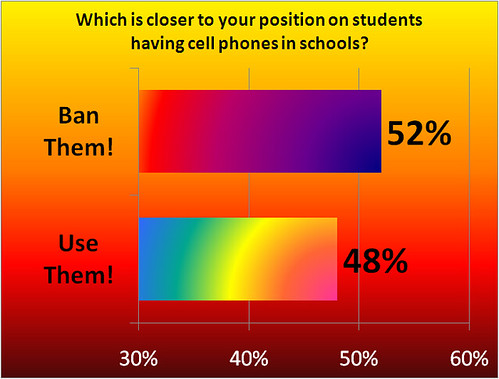
I’ve used Poll Everywhere a couple of times, both as an experiment to see how well it works and also, most recently, to try to make a point. In addition to yesterday’s post titled Things I Don’t Believe (see slides 2 & 3), I also used Poll Everywhere with the poll embedded in a PowerPoint slide. I was using the Turning Point clickers with the audience of about 315 educators when about halfway through the presentation I asked how many of them had cell phones. At least 250 hands went up in the auditorium.
I asked them to take out their cell phones if they had a text messaging service with their phone. Then the poll question appeared on the screen.

Q: Which is closer to your position on students having cell phones in schools?

A1: Ban them! They are a complete distraction and detract from learning.

A2: Use them! They are powerful devices that can be used for learning.

Suffice it to say that I found the irony quite enjoyable. Teachers using their cell phones to answer a poll question saying that cell phones should not be allowed in school. I was using the free version of Poll Everywhere so this is actually a very small subset (23 responses) of the people in the room. I was surprised by the nearly equal division of the responses as I expected a higher percentage to say Ban Them! I erred in not getting all of them to respond to the question using the other clickers. Now I really want to know what all 315 of them think about this question.